
Public IP
Starlink and public IP addresses
Cameras, remote access to your home, a server or a VPN all need your connection to be reachable from outside. With Starlink that depends on the plan. Here is what Starlink's help centre says (checked 16 October 2026) and what to do without a public IP.
In short
- Static IP
- not on any plan
- Residential and Roam
- IPv4 behind CGNAT – no inbound connections
- Public IPv4
- only Local and Global Priority, switched on in your account
- IPv6
- on every plan, a /56 prefix
- Port forwarding
- not on the Starlink router – you need your own
€45 from Starlink
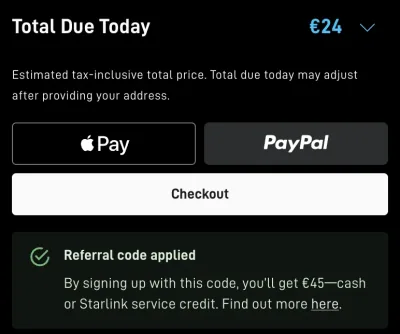
New customers who order on starlink.com through our referral link get €45 as cash or service credit after two months of subscription (zł 190 in Poland, Kč 1,000 in Czechia).
Order Starlink with the €45 reward →Referral link: you get the discount or bonus, the author a small reward. Your price doesn’t go up. How it works
How to get the reward
- Click the link above – starlink.com opens with the referral applied
- Order a Residential or Roam plan – the checkout shows “Referral code applied” with the amount for your country
- Activate your kit and stay subscribed for at least 2 months – then the reward is yours as cash or service credit
When do I get the reward? Starlink says rewards go out from about 60 days after activation – the exact timing depends on your country, account settings and an identity check. You need to stay subscribed for at least two months. In your Starlink account you choose whether you want the reward as cash or as service credit, and Starlink sends an email once it’s confirmed.
| Residential, Roam | Local / Global Priority | |
|---|---|---|
| IPv4 | Shared through CGNAT (100.64.0.0/10) | Public, as an option |
| Inbound over IPv4 | No | Yes, with the public IP and your own router |
| IPv6 | Yes, /56 prefix | Yes, /56 prefix |
| Static IP | No | No – reserved, but it can change |
| Port forwarding | Only over IPv6, with your own router | With your own router |
Sources: Starlink help centre What IP address does Starlink provide?, How do I set my IP to a public IP? and Can I port forward on the Starlink router?, checked 16 October 2026. The tips under “Without a public IP” are general networking practice, not Starlink advice.
Why Starlink doesn't do static IPs
The network hands out addresses based on the ground point of presence (PoP) you connect through. A reservation system keeps the public IPv4 and the IPv6 prefix across restarts, but Starlink's help centre says truly static addresses are not available. If something needs a fixed IP – say, a company firewall allowing your address – expect it to change at some point.
Without a public IP
Cameras and smart home through the maker's app. Most cameras and smart devices connect out to their maker's cloud, so the app works behind CGNAT too. You only need a public IP to connect to a device at home directly.
Remote access with a mesh VPN. Services like Tailscale or ZeroTier build the connection from the inside out, so they work behind CGNAT. You can then reach a computer, NAS or camera at home from your phone anywhere.
A website or service reachable from the internet through a tunnel. For a website, Home Assistant or similar, a tunnel such as Cloudflare Tunnel lets the server at home connect out, and visitors come in through the tunnel instead of your IP.
IPv6 with your own router. Starlink gives every installation a public IPv6 /56 prefix. The Starlink router has no firewall rules, so you need your own router for inbound connections – and it only helps where the device you connect from has IPv6 too.
A truly public IPv4. Only Local and Global Priority plans have it. Switch it on in your Starlink account (Account → Subscriptions → IP policy → Public IP), then restart the Starlink. Even then it is not static: the address survives restarts and power-offs, but moving the dish or a software update can change it.
Frequently asked questions
Does Starlink have a static IP?
No. Starlink offers no static IP on any plan. Local and Global Priority can switch on a public IPv4 that survives restarts, but moving the dish or a software update can change it.
Does Starlink Residential have a public IP?
No. Residential and Roam use CGNAT with shared 100.64.0.0/10 addresses for IPv4, which blocks inbound connections. You only get a public address over IPv6.
Can I port forward on Starlink?
Not on the Starlink router. You need your own router that supports it, and for IPv4 also a plan with a public IP (Local or Global Priority). Over IPv6 it works on the standard plans too, again with your own router.
Does Starlink support IPv6?
Yes, on every plan, router and dish version. Each Starlink gets a delegated /56 prefix.
What does the IP address 206.214.239.194 mean?
According to Starlink's help centre you see this address when the Starlink isn't connected to its point of presence (PoP) and can't get its assigned address.
Is there a Starlink referral reward?
Yes: new customers who order on starlink.com through a referral link get a reward as cash or service credit after two months of subscription – €45 in euro countries.
More Starlink guides
€45 from Starlink
New customers who order on starlink.com through our referral link get €45 as cash or service credit after two months of subscription (zł 190 in Poland, Kč 1,000 in Czechia).
Order Starlink with the €45 reward →Referral link: you get the discount or bonus, the author a small reward. Your price doesn’t go up. How it works